Keeping Ubuntu background process running after exit of ssh
- ssh into the remote machine
- start
tmuxby typingtmuxinto the shell - start the process you want inside the started
tmuxsession - leave/detach the
tmuxsession by typing Ctrl+B and then D
Blogging from the Paradise Island of Mauritius
tmux by typing tmux into the shelltmux sessiontmux session by typing Ctrl+B and then D
Dodo written by
Unknown
at
3:04 PM
0
dodo shouts
Here is what I achieved note wise:
1. Installation
After having finally downloaded my ISO of Ubuntu , I mounted my iso file using Alcohol 100% which is a neat little tool that allows you to simulate a CD or DVD drive on your pc. Afterwards using Nero I burnt it to a CD-RW .Mind you if you want to use a DVD-R or DVD-RW it just won't work.
After like 5 minutes I got my Live CD for Ubunto 6.10 and I merrily restarted my pc with the CD inside. I was pleasantly greeted with the Ubuntu logo and had a quick look at the OS GUI before deciding to install it.
2. GRUB Booloader
However I am getting quiet an issue with GRUB which is the bootloader for Ubuntu (and Kubuntu). GRUB menu list shows Ubuntu and Windows XP in the boot menu screen at startup, however am unable to move the highlighter down to Windows XP for every 6 or so times I restart my pc.It appears that on the boot menu my keyboard is rendered inactive.
I had a similar problem with Kubuntu's GRUB and I still yet need to investigate why this is so. To temporarily solve this PITA I had to modify the menu file for GRUB which showed the different OS installed on my system. So I clicked on Places -> Computer -> boot -> grub .
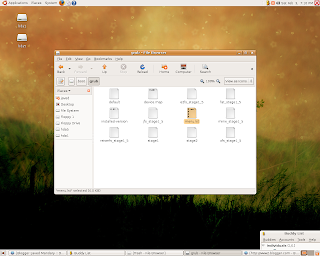
Now you will see a file called menu.lst . However unlike windows you require to have permissions in Ubuntu (Linux,etc..) to be able to make System Admin modifications. In short you need to be root which is the Super Mega Powerful User of all times in the Linux World, able to delete , rename , edit any file.
To achieve this if you are in Ubuntu you need to log in as root ...whats good is that you do not actually need to restart and enter root in the GNOME login screen ..as it is this just wont work. You need to launch nautilus .
3. Creating a password for root
However prior to that you should create your root password , unlike windows where the Super Admin creates his password at the start of the installation , on Ubuntu the password must be created after the OS install. So here is the command to execute :
sudo passwd rootEnter your current account password , then confirm the new password that you want to set against root.
Dodo written by
Unknown
at
6:26 PM
3
dodo shouts
Category: Javed Mandary, Kubuntu, Linux, Ubuntu, Windows
Being a hardcore Windows XP user it took me a lot of years and convincing to finally appreciate using Linux. This occurred mainly because i started working a lot on our office Redhat box.
Last week I thought it was high time for me to boot up on Linux at home too . One of my friends had a Kubuntu live CD so I thought I would give it a try. The live CD allows you to run the OS without from a CD or DVD without actually requiring that the OS be installed on your PC.
This is a good strategy to win Window users over and it worked on me. So after trying out the live CD I was convinced enough to install Kubuntu , which is a KDE version of Ubuntu. I was really pleased to find that it sported all that I required on my home PC , an internet browser called Konqueror , RSS feed reader and even an instant messenger that allowed me to connect to MSN. I was thrilled to find that My.T was working seamlessly and I could connect to the internet without any hitch.
However after a few hours I decided that Konqueror was not the best browser around so I downloaded FireFox2 but was unable to install it. Furthermore I was unable to see any flash enabled websites because the Flash on Kubuntu can be installed primarily only on Firefox browsers. Damn I was annoyed , I searched and searched the web but I learnt that the mainstream version Ubuntu come loaded with Firefox and that it was sporting GNOME instead of KDE.
Now I wanted to get rid of my Kubuntu so as I can later download Ubuntu and install that instead. I thought maybe formatting the 36GB root partion and 1GB swap Linux partions would remedy the problem... I was wrong . I had to actually modify my GRUB config file , GRUB is the bootloader used by Kubuntu, and remove the entries for Kubuntu leaving only those for Windows XP.
After that all that was required, according to my friend and the different sites I visited, was that I needed use a windows bootdisk and perform fdisk /mbr .
So I went into the Phoenix bios set up of my core duo ,to boot on diskette instead of on CD, only to find out that the vendor had placed a password for the bios . Reading online i discovered that there was a backdoor password for Phoenix bios which was "phoenix" and which of course didnt work! So now am downloading a bootable CD ISO which would allow me to remove the damn GRUB thing.
In parallel am also downloading an ISO for Ubuntu 6.10 using uTorrent client , which is the best torrent client I've seen so far even better than Azareus.
My Linux experience is yet to be over ..i will keep you updated!