Showing posts with label Blockchain. Show all posts

Sunday, November 13, 2016

Truffle and Ethereum - call vs transactions

After banging my head for 4 hours trying to figure out why my sample Dapp doesn't actually save (persist) data to my contract I found out that i was actually making a call instead of executing a transaction .

What's the difference between a call and a transaction you say ?

- Well a call is free ( does not cost any gas ) , it is readonly and will return a value
- whilst a transaction costs gas , it usually persists something and does not return anything

Please read the "Making a transaction" and "Making a call" section in the offical lib:
https://truffle.readthedocs.io/en/latest/getting_started/contracts/ 

Say for example in your app.js of your truffle app you have a fictionious setComment and getComment function ( to persist and retrieve comments respectively ) this is how they could look like :

===Extract app.js====================

function setComment(){

 // Assuming your contract is called MyContract
  var meta = MyContract.deployed();

//Taking a comment field from page to save 
  var comment = document.getElementById("comment").value;

// Note that the setComment should exist in your MyContract
  meta.setComment(comment,{from: account}).then(function() {

    setStatus( "Tried to save Comment:" +comment);
  }).catch(function(e) {
    console.log(e);
    setStatus("Error saving comment .. see log."+ e);
  });
}


function getComment(){
  var meta = MyContract.deployed();

 // notice that in the readonly getComment method that after method name a .call is used
// this is what differentiates a call from a transaction
  meta.getComment.call({from: account}).then(function(value) {

    setStatus( "Comment:" +value);
  }).catch(function(e) {
    console.log(e);
    setStatus("Error retrieving comment .. see log."+ e);
  });
}

=============================


Wednesday, November 02, 2016

Ethereum Blockchain Simple Contract Example

This article is about how to get started with creating and deploying a really basic smart contract on the Ethereum network using the Truffle development environment and some solidity scripting .

Solidity is the language in which the contracts are writing its pretty simple enough but lets make some small steps against which then we can build more complex scenarios.

Assumptions :


  • We are deploying to an Ubuntu env. , although the commands could be adapted to whichever environment your using 
  • We are starting with a fresh Ubuntu with nothing on it
  • Ubuntu version used is 16.04 LTS
  • We are going to use a development framework such as Truffle to help us in quickly testing our smart contract
  • We are not going to connect to either the live or test 'morden' Ethereum network instead we are going to run a test environment locally, this is done via the ethereumjs-testrpc
  • Ubuntu server in my case is a t2.medium server 2 cpu with 4GB RAM at least 

Prerequisites

- NodeJS 6

Execute the following commands :


sudo apt-get install python-software-properties
$ curl -sL https://deb.nodesource.com/setup_6.x | sudo -E bash -
sudo apt-get install -y nodejs
sudo apt-get -y install build-essential


-Install GIT:
sudo apt-get -y install git

- Install truffle:
sudo npm install -g truffle

- Install euthereumjs-testrpc:
sudo npm install -g ethereumjs-testrpc


Starting Test Ethereum Node

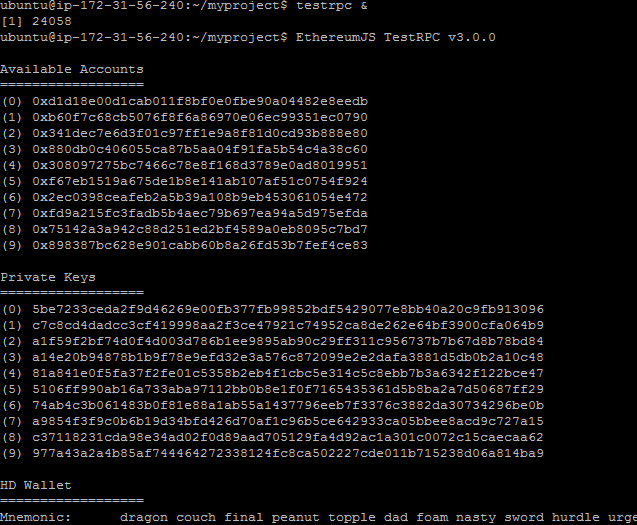
Assuming all the installs above were executed without any issues , the first thing to do is fire up your test rpc server using the following command :

testrpc

This should output something like this:


Truffle Workspace

Now lets follow the example from the truffle website on getting started  :

1. Create a directory myproject : mkdir myproject 
2. cd to the directory : cd myproject
3. Execute the truffle initialisation command : truffle init

This will generate a number of truffle files to ease our development to check the official documentation to stay up to date with more extensive information around what each folder and each file does .

However we are concerned at the moment only with the contracts and this would be in the contracts folder where you will see the following files:
ConvertLib.sol  MetaCoin.sol  Migrations.sol


The MetaCoin.sol is the main contract , it imports the ConvertLib.sol library and the Migrations.sol tells truffle how the contracts needs to be deployed. Feel free to open them to have a look.


Adding our own contrats 

Now in that same directory we are going to add 2 new sol files for a very simple dummy hello world type application  ( contract name and file name needs to be exactly the same ) :

-------Contents of Mortal.sol----------

pragma solidity ^0.4.4;
contract Mortal{

    address public owner;

    function mortal(){
        owner = msg.sender;
    }

    function kill(){
        suicide(owner);
    }
}

-----------------


Then another sol file


-----User.sol-----------------

pragma solidity ^0.4.4;
import "Mortal.sol";

contract User is Mortal{

        string public userName;
        string public ourName;

        function User(){

          userName= "Javed";
        }

        function hello() constant returns(string){
        return "Hello There !";
    }

        function getUserName() constant returns(string){
        return userName;
    }
}
-----------------------------------

If you want to know what these files are doing along with syntax i suggest that you follow this great video from one  awesome guy that allowed me to get started quite quickly here are his videos you should watch ( subscribe to his channel ) :


In our case we modified his example such as we get something we can very quickly run and see what happens :) !!

Also in his example he uses the Ethereum wallet but this was a very process for me as the wallet keep synching for a very long time and not even sure if its working fine as well , so better start with a test env . with testrpc .

Truffle Compile

Now go on the console and run the compile command  : 

truffle compile

This will compile your contracts in bytecode .


Truffle Migrate

Now lets move the compiled contracts to test env. ethereum node that is testrcp :

truffle migrate

You should see something like in the left window :


Truffle Build

Now you can build a dapp ( distributed application ) using truffle , i wont go in the details of this as you will find more information from the main documentation page and i am only going to get you started quickly.

Command is well :

truffle build


Truffle Console


Truffle comes with a console that allows you to tap directly into your deployed contract so what you want to do is fire up the console using the command :

truffle console 

Try to execute the following commands :

User.deployed();

User.deployed().userName.call();

User.deployed().hello.call();


You should be able to retrieve values from public property userName and execute function hello.


Conclusion

We managed to :
1. Setup an ubuntu server with all the tools we need to start developping dapps ( nodejs , truffle , ethereumjs-testrpc )
2. We managed to learn about the development framework truffle how to use it
3. We created , compiled and deployed a simple dummy contract to the testrpc node
4. We managed to even call the contract 


Monday, October 24, 2016

First Steps with Blockchain

Blockchain can be very confusing to start with so I will be documenting my findings on my blog such as to keep a trace of how to set it up and get started creating decentralized apps also known as dapp .

I have purchased a book which is really interesting and that explains where we are currently as far as cytocurrencies are (e.g BitCoin , ether , litecoin ) but also the history behind blockchain. The book is called Decentralized Applications written by Siraj Raval . I really appreciated the way that the author explained the concepts in a simple but yet extensive manner , only problem I got was that when I came to chapter 3 where the author basically references open source github project to create a dapp that basically mimics twitter , the github urls are all broken hence the application example is really hard to follow.

Now currently trying to make the hello world application for Ethereum work , steps have been explained on this blog post although running a contract seems to be churning out all kind of errors: